

This project provides a custom and enhanced message box replacement for the default `MsgBox`found in Access. A Test database containing all the code for Access 2007/2010/2013 is available at the bottom of this post.
(__UPDATED Saturday 21OCT2014 to VERSION 1.10.__)
###What’s wrong with the default MsgBox###
The default message box in Access is sometimes useful to warn, inform or ask confirmation from the user.
It has, however, a few drawbacks:
* It is bland: the standard message box does not even follow the currently selected Office colour scheme.
* The amount of text it can display is limited: if you try to display too much text it will be truncated.
* You can’t copy or save the content of the message.
* Because popup boxes are viewed as intrusive, people tend not to read them and end-up closing message boxes before they realize they may have contained useful information.
* They only displays plain text: you cannot format the message to draw attention to the key points.
* They are blocking, meaning that nothing can happen in the main application while the box is displayed (it can’t even shut down).
* It will only appear on the monitor that has the main Access application window, even though the message box may have been opened from a form on another monitor.
Sometimes you need to display an important message or require users to make take a decision.
Message boxes are not to be abused but they serve a useful purpose.
###An enhanced message box###
Rather than using the bland standard message box you can now have something a bit more customized.
**Plain Text** version of the enhanced custom message box under the Office Blue Colour Scheme:
**RichText** version of the enhanced custom message box under the Office Black Colour Scheme:
Here are the features of the enhanced message box:
* It is entirely compatible with the standard one: just change `MsgBox` to `Box`
using _find and replace_ should be enough (see tip below to avoid getting strange errors).
* It allows the user to simply click on a button to copy the content of the message to
the clipboard or save it to a text file to a configurable default location.
* It looks and feels like it belongs to the main application, following its colour scheme.
* It attempts to prevent users from blindly closing the modal box reading the message: buttons will first be inactive for a configurable amount of time. It’s not a perfect solution, but it is quite effective.
* There is a `RichBox` version that can display rich HTML content, not just plain text, so important parts of the message can be formatted in a useful way.
* It is able to display large amount of data. While it’s not something you usually want, it may be useful for the message box to display more text in some situations (log or tracing information, legal documentation, etc).
* Rather than sprinkling your code with “`& vbCrLf & _`” uglies, you can embed newlines in the text itself by using C-style “`\n`” escape sequences that will automatically be transformed into the appropriate newlines. Makes for clearer code and less typing.
* Because you get the source, you can easily customise the message box with new icons and colours to better match your overall application’s personality.
* It is non-blocking: if your application forces users to log-off after a certain amount of inactivity, the enhanced message box will just close rather than prevent Access from shutting down like the standard `MsgBox` does. Of course, it’s up to you to decide how to handle that gracefully, if at all.
* It properly displays the expected button captions based on the language of the operating system, so it behaves very much like the default `MsgBox` (for instance, it will properly display “_Cancel_” on English systems and “_Annuler_” on French ones).
* It also properly plays the system sounds associated with the type of message. You can also enable or disable the sound effect as needed.
* From of version 1.4, it will display on the correct monitor in a multi-monitor environment.
* Version 1.7 adds support for [Unicode escape sequences][7] within strings to display Unicode characters in the dialog box. This was added following the publication of [this article about .Net Strings][6] in VBA.
* Version 1.10 adds a feature that allows users to dismiss a particular message so it doesn’t appear again.
###How to use it###
Download the demo database below and copy (drag & drop) the following into your application:
* the `FormDialog` form,
* the `Dialog` module.
If you rename the `FormDialog`, make sure you replace any occurrence to it in the code, in particular in the `Dialog` module.
Since the enhanced message box is just a replacement for the standard one, you just use it like you would use the `MsgBox`.
~~~~brush:vba
‘—————————————————————————–
‘ Simple use of the Plaintext box
‘ Note the use of n that will be converted into a newline
Dialog.Box “This is a plaintext message.\nClick OK to dismiss”,
vbOKOnly + vbinformation, _
“Message Title”
‘—————————————————————————–
‘ Getting the result back
Dim dr As vbMsgBoxresult
dr = Dialog.Box(“Are you sure you want to delete?”, _
vbYesNoCancel + vbQuestion, “Confirm action”)
If (dr = vbYes) Then DeleteRecords
‘—————————————————————————–
‘ Using named parameters
Dialog.Box Prompt:=”All your bases are belong to us”, _
Buttons:=(vbOkOnly + vbCritical), _
Title:=”Bad error”
‘—————————————————————————–
‘ Using the RichBox to display simple HTML
‘ The first line will be bold, then the word ‘button’ will be printed in red
‘ Here the \n will be escaped to ‘
‘ tags to simulate newlines.
Dialog.RichBox “This is a bold message.\n” & _
“Click the button to dismiss.”,
vbOKOnly + vbInformation, _
“RichText Message Title”
~~~~
###Options###
There are a few additional settings that can be used to change the behaviour of the enhanced message boxes.
####Custom buttons#####
You can customise the button labels instead of using the default ones (thanks to Kristjan for the suggestion):
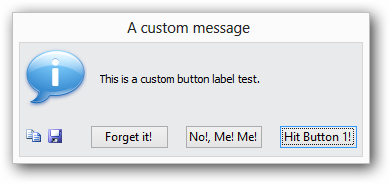
~~~~brush:vba
‘—————————————————————————–
‘ Use custom labels. Buttons that are not labelled will not be displayed
‘ The returned value is either vbBt1, vbBt2 or vbBt3
Dim dr As vbMsgBoxresultEx
dr = Dialog.Box (Prompt:=”This is a custom button label test.”,
Buttons:=vbCustom + vbInformation, _
Title:=”A custom message”, _
LabelButton1:=”Hit Button 1!”, _
LabelButton2:=”No!, Me! Me!”, _
LabelButton3:=”Forget it!”)
If (dr = vbBt1) Then Debug.Print “Button 1 pressed!”
ElseIf (dr = vbBt2) Then Debug.Print “Button 2 pressed!”
ElseIf (dr = vbBt3) Then Debug.Print “Button 3 pressed!”
~~~~
####Button delay#####
One is that you can adjust the delay before the buttons become activated.
~~~~brush:vba
‘—————————————————————————–
‘ Use the ButtonDelay to specify the time in seconds before the buttons become activated
‘ The default is 2s. Use 0 to activate the buttons immediately.
Dialog.Box Prompt:=”All your bases are belong to us”, _
Buttons:=(vbOkOnly + vbCritical), _
Title:=”Bad error”, _
ButtonDelay:=1
‘—————————————————————————–
‘ Change the default delay value.
‘ To disable the activation delay
Dialog.DefaultButtonDelay = 0
‘ To make the user wait 3 seconds before they can press any button
Dialog.DefaultButtonDelay = 3
~~~~
####Beep#####
Another one is that you can enable or disable whether beeps should be played or not.
~~~~brush:vba
‘—————————————————————————–
‘ Use AllowBeep to specify whether beeps should be played when the message box opens
‘ By default, they are.
Dialog.Box Prompt:=”All your bases are belong to us”, _
Buttons:=(vbOkOnly + vbCritical), _
Title:=”Bad error”, _
AllowBeep:=False
‘—————————————————————————–
‘ Change the default behaviour. This is True by default.
Dialog.DefaultAllowBeep = False
~~~~
####Hide Buttons#####
You can also hide the Copy to clipboard and save to File buttons which are normally visible by default.
~~~~brush:vba
‘—————————————————————————–
‘ Use AllowCopyToClipboard and AllowSaveToFile to specify whether to display
‘ the copy to clipboard and save to file buttons.
‘ By default, they are visible, but here we hide them.
Dialog.Box Prompt:=”All your bases are belong to us”, _
Buttons:=(vbOkOnly + vbCritical), _
Title:=”Bad error”, _
AllowCopyToClipboard:=False, _
AllowSaveToFile:=False
‘—————————————————————————–
‘ Change the default behaviour. This is True by default.
Dialog.DefaultCopyToClipboardAllowed = False
Dialog.DefaultSaveToFileAllowed = False
~~~~
####Save Folder#####
It is recommended to set the the folder where we should save the content of the message when the user clicks the Save button on the message box.
~~~~brush:vba
‘—————————————————————————–
‘ Change the save folder.
‘ By default, the text messages will be saved in the same directory as the database.
‘ Here we want them to be saved to a temp directory
Dialog.DefaultSavedTextFileFolder = “C\:temp”
~~~~
These few settings make the enhanced message box more customizable.
####Raw text and paths#####
By default, the enhanced dialog box will escape certain sequences in the message to convert them to their printable version:
– Escape sequences like `\n` and `\t` are converted to newlines and tabs spaces
– Unicode sequences are converted to their symbol: `\u20ac` is converted to the euro symbol `€`.
If you do not want this behaviour (for instance you need to display data that contains lots of `\` characters), use the `NoStrEsc` option:
~~~~brush:vba
‘—————————————————————————–
‘ By default, all messages are unescaped.
‘ Here however, we want to disable that so we can display
Dialog.Box Prompt:=”A path c:\my\doc\file.doc”, _
NoStrEsc:=True
‘—————————————————————————–
‘ Change the default behaviour. This is False by default.
Dialog.DefaultNoStrEsc = True
~~~~
Alternatively, you can use the helper function `dialog.EscBackslash()`:
~~~~brush:vba
‘—————————————————————————–
‘ Use EscBackslash() when you only want some portion of text
‘ to display ‘\’ correctly, like paths.
‘ Here however, we want to disable that so we can display
Dialog.Box Prompt:=”A path ” & EscBackslash(“c:\my\doc\file.doc”)
~~~~
####Don’t display this message again#####
Based on suggestions (and on a feature I wanted to implement for a while), I added a way to allow the user to choose not to display a particular message again.
>Note that this feature will only work for dialog boxes displaying a single `vbOKOnly` button. It makes some sense since if you ask the user to choose between multiple actions, you can’t really expect their choice to be the same every time the message is displayed.
To make the dialog box dismissable, you only need to provide it with a unique ID for the message, using the `DismissID` option:
~~~~brush:vba
‘—————————————————————————–
‘ Use DismissID to allow the user to never show the message again.
Dialog.Box Prompt:=”An annoying warning message”, _
Buttons:= vbOKOnly + vbExclamation
DismissID:=”1234ABC”
~~~~

The user can then tick the box and this particular message will never be shown again (unless we reset the setting for it).
To ensure that the user’s choice is remembered even if the Access application is updated, the message’s `DismissID` is stored in the registry under:
`HKCU\Software\VB and VBA Program Settings\
You can easily re-enable a particular message or all messages from your code:
~~~~brush:vba
‘—————————————————————————–
‘ Re-enable the display of a previously dismissed message:
Dialog.ResetDismissID “1234ABC”
‘—————————————————————————–
‘ Re-enable the display of all messages:
Dialog.ResetAllDismissID
~~~~
###Large text###
The standard `MsgBox` cannot display much text. On the other hand, there is no real limitation to the amount of text the `Box` and `RichBox` can display.
When the amount of information is too much to fit the maximum allowed size for the message box the text will overflow and can be scrolled up/down as necessary.
###Limitations of the RichBox###
The `RichBox` version relies on the normal TextBox control’s ability under Access 2007 to display RichText wich is nothing more than lightweight HTML.
Because font size may be varying a lot in the message, it becomes very difficult to accurately predict the size of the box needed to display the whole message.
Short of implementing a complete HTML engine, we have to rely on some assumptions to display HTML.
The risk is that sometimes the content may not properly fit the TextBox control in some circumstances.
If you use the `RichBox`, thoroughly try displaying your messages and tweak the HTML as necessary to include additional lines or non-breaking spaces to ensure that the result looks good.
If you don’t overuse font size and don’t display in multiple fonts the `RichBox` should do the right thing most of the time.
Don’t overuse the `RichBox` to display colourful messages. There is a fine line between being informative and tasteless. Keep colours and formatting where it is useful.
I think that in most cases, the plain text version `Box` is more than enough.
###How it works###
The code makes extensive use of Win32 API calls.
Most of the hard work is done in the `FomDialog` class form. There is too much there to really go into the details but you are welcome to have a look at the commented code.
The code relies also on a utility function from _Stephen Lebans_ used to calculate the size of of text. I have made some minor modification to that code so I would refer you to his original implementation if you are interested in calculating TextBox sizes for forms or reports.
In the code for the `FormDialog`, I re-implement some of the expected functionalities of the `MsgBox`: proper arrangement of the buttons, displaying of the appropriate icon, etc.
Once this is done, we calculate the size of the textbox needed to display the whole of the message.
In the case of RichText, we first use `Application.PlainText()` to convert the HTML into properly formatted plain text. We then calculate the Textbox size using a slightly larger font than needed as a way to ensure that the content of the RichText message will fit the box in most cases.
Once we know the size of the TextBox, we can easily resize the form to properly display the TextBox.
If there is too much text, we resize the form to its maximum permissible (70% of screen width and 90% of screen height) and change some of the visual cues to let the user know the text is overflowing.
One thing of note is the way the form is kept modal.
Rather than using `DoCmd.OpenForm` and `DoCmd.Close` I use the form as a class and create an instance manually (see the code in `Dialog.Box` and `Dialog.Richbox`). I keep this instance alive until I got the form’s result back.
If you are interested in knowing how the form is made modal, this is the code in `FormDialog.ShowModal()` what keeps the form open until the user clicks a button:
~~~~brush:vba
Public Function ShowModal() As VbMsgBoxResult
…
‘ Here we reset the result for the clicked button such as vbOK, vbYes, etc
‘ This is set in each Button’s Click event
m_Result = -1
‘ Wait for the user to click a button
Do While (m_Result = -1)
DoEvents
Sleep 50
Loop
ShowModal = m_Result
End Function
~~~~
The `Sleep()` function is a Win32 API that stops the current process for the given number of milliseconds. This in effects hands back the control to the Operating System for a short time. That way the system is still responsive and does not consume resources when it’s just waiting for user input.
###Replacing MsgBox in existing code###
As I said above, replacing the standard `MsgBox` is easy but you need to make sure your search and replace parameters are configured correctly:
If you’re getting strange compile errors, it may be because you forgot to tick the _Find Whole Word Only_ and some of the strings containing the letter sequence “msgbox” were replaced in the process.
If that’s the case, you can revert the damage by simply doing a search and replace across the whole project on:
– `VbboxStyle` or `VbDialog.BoxStyle` to be replaced with `VbMsgBoxStyle`
– `VbboxResult` or `VbDialog.BoxResult`to be replaced with `VbMsgBoxResult`
###Upgrading from an older version###
If you are already using the enhanced DialogBox, upgrading to the newest version is simple.
In your Access application:
* delete the `FormDialog` form,
* delete the `Dialog` module.
* delete the `API_GetTextMetrics` module if you have it (used in versions before 1.5)
Download the new version of the demo database below and open it.
* drag and drop the `FormDialog to your application
* drag and drop the `Dialog` module to your application
That’s all you need to do.
###Code and demo database###
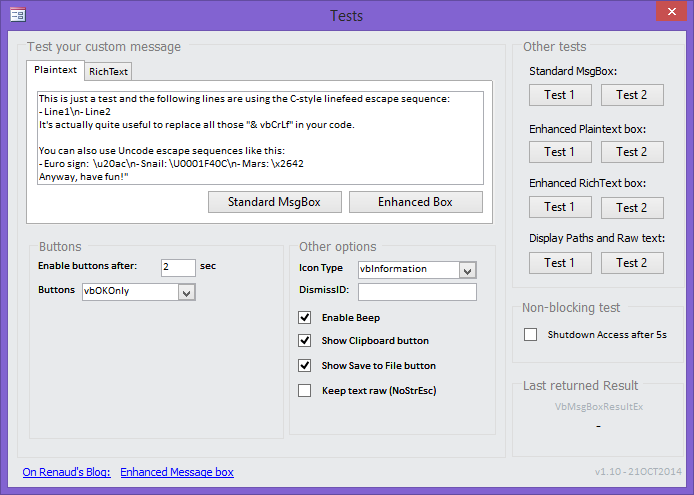
You can download a database containing all the necessary code as well as a number of tests.
This version contains the database in Microsoft Access accdb format (the code relies on features that don’t exist in pre-2007 versions of Access).
![Download][D] Download the EnhancedMsgBoxv1.10.zip (177KB), version 1.10 – 21OCT2014 containing the ACCDB database.
###Code Updates###
_v1.10: 21OCT2014_
Corrected minor bugs and added new features:
– Added `dialog.EscPath()` to escape paths in your message and display them correctly, as suggested by [Mark Singer in comment 115](/2008/ms-access-enhanced-message-box-replacement/#comment-105338).
– Added option `NoStrEsc` to display raw text when you don’t want escape and unicode sequences like ‘\n’ and ‘\u20ac’ to be converted at all in your whole message.
– Modified the code for `FileExists()` to avoid the issue raised by [Matthias Kläy in comment 116](/2008/ms-access-enhanced-message-box-replacement/#comment-105339)
– Added option `DismissID` to allow the user to choose to prevent a message from displaying again (suggested by [David Dewick in comment 110](/2008/ms-access-enhanced-message-box-replacement/#comment-47737)).
_v1.9: 03FEB2014_
Corrected some bugs and added some options:
– Corrected bugs that would throw exceptions when a message would contain some
file path whose ‘\’ would be wrongly interpreted as an escape sequence.
– Added options to show the buttons for copying the message to the clipboard
or saving it to file.
_v1.8: 28SEP2013_
Resolved some Unicode-related bugs:
– Corrected bugs that would truncate the strings in the dialog box when they contain some Unicode characters.
– Corrected bug with copy-to-clipboard that was not copying Unicode text.
– Corrected bug with copy-to-file that was not saving Unicode text properly.
_v1.7: 13SEP2013_
Added support for character literals in strings and Unicode escape sequences as supported in .Net strings.
See [using .Net strings in VBA for fun an profit][6] for details.
_v1.6: 29JUN2013_
Corrected issues pointed out by Joseph Strickland (thanks) when running under
Office 2010 x64.
Code updated and tested under a Virtual Machine running Win8 x64 and Office 2010 x64.
_v1.5: 23JUN2013_
Many thanks to contributors Steve Spiller, Jiriki and Kytu for improving and
pointing out issues. See details below.
– Moved the code from the API_GetTextMetrics module into the FormDialog class
to reduce the number of necessary files (now only FormDialog and Dialog objects
are necessary).
– Corrected bugs on the test form (button delay and beep options on the form
were not wired up correctly in the test form)
– RichBox was not initialising its buttonDelay correctly, resulting in the first
call to use a 0 delay instead of the DefaultButtonDelay value.
– Corrected bug reported by Jiriki on 06JUN2013 (when the ButtonDelay was set
to 0, the dialog would just close the first time the dialog was opened).
– Focus issues should be solved: the buttons are now properly focused and will
behave as the standard dialog box (you can hit ENTER or ESC on the keyboard
once the buttons are visible to confirm the default dialog action or cancel
it).
– Addressed parent form focus issue mentioned by KyTu on 19JUN2013: when closing
the dialog, the parent form will be properly focused instead of the Navigation
Panel.
– Now supports both x86 and x64 Office systems (32 and 64 bits versions of
MSAccess). Many thanks to Steve Spiller for sending me the updated database.
_v1.4: 01APR2013_
It’s been a while, but at last some improvements and bug fixes!
* As per Julie B’s comment, updated code to properly display the dialog on the proper monitor in multi-monitor environments.
The dialog box will open in front of the Access window that currently has focus (assumed to be the one that opened the dialog), so if your application has forms on different monitors, the dialog should open on the right one. If we can’t determine the active window, the dialog box will open in the middle of the monitor containing the main Access application window.
* Implemented Kristjan’s suggestion regarding the use of custom button labels. See updated description above.
* Corrected background colours for the dialog box so they correctly match the MS Office theme.
* Corrected a bug in the code that decided of the correct sound to play.
_v1.3: 17MAR2009_
Thanks to Henry of [Access-Pro.de](http://www.access-pro.de/) for proposing a correction to the default buttons behaviour.
* Updated behaviour for the default buttons. They are now focused in a way that matches that of the standard msgbox.
* Reversed the naming of the buttons on the form to make it a bit more consistent with the standard box.
_v1.2: 07SEP2008_
Thanks to Andy Colonna (
* Corrected bug in `Form_FormDialog.FilenameSanitize()` function that would
fail to remove all invalid characters for a file name.
* File name for the saved text message will be truncated to first 32 characters
of message box title in `Form_FormDialog.MakeFriendlyFileName()`.
* Changed the use of `FollowHyperlink` to `ShellExecute` to avoid security warning
in some instances in `Form_FormDialog.btCopyToFile_Click()`
* Corrected twips to pixel conversion bug in `API_GetTextMetrics.fTextWidthOrHeight()` that
would result in an improperly sized dialog box when the text message was too
wide.
_v1.1: 08AUG2008_
* Corrected code for `DefaultButtonDelay` (thanks to Geoffrey) (was referencing
wrong variable, causing self-referencing code).
* Corrected code for `Box` and `RichBox` to take the `DefaultSavedTextFileFolder`
into account (the path was previously not passed onto the dialog boxes and
the text file would always be created in the application folder instead of
the one specified by `DefaultSavedTextFileFolder`)
* Added license notice at top of source code.
_v1.0: 20MAY2008_
* Original version
###Resources###
* Dissecting the MessageBox article on CodeProject
* XMessageBox – A reverse-engineered MessageBox() article on CodeProject
* TextWidth-Height code demo from Stephen Lebans (great resource, check it out!).
* Pixel to Twips conversion from MSDN.
* Copy Text to Clipboard from the excellent site The Access Web.
* Getting Resource Strings and more from DLLs.

This work is licensed under a Creative Commons Attribution 3.0 Unported License.
Free for re-use in any application or tutorial providing clear credit is made about the origin of the code and a link to this site is prominently displayed where end-users can easily access it.
[1]: /wp-content/uploads/2008/05/sshot-79.png
[2]: /wp-content/uploads/2008/05/sshot-81.png
[3]: /wp-content/uploads/2008/05/sshot-78.png
[5]: /wp-content/uploads/2008/05/sshot-407.png
[D]: /wp-content/uploads/2008/05/download.png
[SC]: http://www.pcesoft.com/Access-Spell-Checker-Tool-Source-Code.html
[6]:/2013/access-using-net-strings-in-vba-for-fun-an-profit/
[7]:http://msdn.microsoft.com/en-us/library/aa664669(v=vs.71).aspx
Comments
WAO !! i cannot say more . . . this is extremely good . . . i saw other solutions but yours surpass all others, congratulations . . . keep on doing the good work . . .
Thank you Edwin. There are plenty more that I’d like to do, just a matter of finding the time…
Simply smart! Thank you, Sir!
Simply fantastic, great work, thank you!
Renaud, Your website was a real find. I love the enhanced message box utility for Access, as well as the modal dialogs with transparent backgrounds. These are awesome tools that help Access developers to create interfaces that have some visual appeal. Thanks so much for your efforts and generosity. Ken Warthen
Thank you for your kind words, I’m glad you found some of these articles useful.
Renaud, I have briefly looked over your custom message box concept and like what I see. I am curious, however, because unless I am mistaken you have implemented it in Access using standard modules rather than as a class. Is there any particular reason you didn’t create a class instead? Glenn
Hi Glenn, I think the main reason I didn’t use a class was that I wanted a drop-in replacement for the standard MsgBox. Using a class would have required creating an instance of it either every time the box would be used, or stored somewhere in a module. Classes also become an issue as they cannot be instantiated directly from a library (the way I usually re-use code) and you must end-up having a class factory in a Module instead. It doesn’t mean it can’t be done. I just don’t think it bring anything useful doing it in a Class as opposed to a Module in this case. Maybe I’m wrong and there is a better way. In that case let me know 🙂
Renaud, Thanks for that. Your explanation makes perfect sense and I can’t think of a compelling reason to suggest that a class based alternative would be preferable. Code libraries are certainly the way to go for frequently used code. While using a class in this case doesn’t appear to offer an advantage over your standard module approach, you might be interested to know that there are a couple of ways to include classes in code libraries such that any application using the library can create instances of the relevant classes. Glenn
This is rather awesome! Mind if I take a shot at back-grading it to Access 97?
@Glenn: I use a simple module that I call “ClassFactory” whose only purpose is to return an instance of the Classes in the library. Not sure if there is a better way. @Moo: please be my guest. I have been thinking about this recently but since I only have Access 2007 testing for older version is a bit of a challenge. Adapting the code to older versions should not be difficult if you stick to plain text. You will have to remove references to the “TextFormat” property of the txtMessage textbox as it is new in Access2007 and used to switch between plain text and rich text. As far as I know, the only way to bring rich text to older versions of Access is to use a webbrowser control. If you manage to convert it, please send me the updated database so I can host it here for all to find.
Renaud, You can do without the module by manipulating the class module’s Instancing property. The catch is that the property sheet doesn’t allow the setting you need but you can run a single statement in the immediate window to do the job. See this post http://www.utteraccess.com/forums/showthreaded.php?Cat=&Number=1441683&page=&view=&sb=5&o=&vc=1 Glenn
Hi Glenn, thanks for the tip!
Renaud, I gave it a shot and without the RTF it just wouldn’t be the same; so I chose not to pursue it any further. The Access 2007 version is striking! Thanks! Moo
Get a compile error when trying to run it. “User defined Type not defined”……..Dim f As New Form_FormDialog. Have the same references checked in my Access 2007 VBA. Looks great. Would like to solve the problem to be able to use it. Thanks. Larry
This is excellent. I’ve just added it to a new application and it looks far better and I like the ability to copy the message to the clipboard. It is also very good that it is non-blocking, i.e. I can now more easily chuck users out of my systems if I want, say, after a period of inactivity. A point that people might find useful is that rather than replace all instances of Msgbox in your code with the word “RichBox”, you can rename the new RichBox function as Msgbox. When your code then goes to call the Msgbox function, it then calls the new function, i.e. the old Msgbox gets overridden and the new function is called instead.
@Larry: does this happen with the demo or in your application? Have you renamed the FormDialog? if that’s the case, make sure to change the line where you get the error to reflect the new name. Another possibility is security settings: if you’re getting a security warning when opening the file, make sure you open it from a Trusted location or some functions will be disabled. @Alan: it’s a good point and it could make replacement much easier, although I usually prefer to err on the side of caution and avoid overriding base functionality to avoid unintended consequences (and keep in line with the “element of least surprise” motto by making things explicit). 🙂
Thanks for the great object! Out of Stack Space Error Occurs when modifying DefaultButtonDelay. Try modifying the Enable Buttons In: field in sample form Problem occurs in module Dialog: Reads: Public Property Let DefaultButtonDelay(delay As Long) If delay < 0 Then delay = 0 DefaultButtonDelay = delay End Property Should read: Public Property Let DefaultButtonDelay(delay As Long) If delay < 0 Then delay = 0 m_DefaultButtonDelay = delay End Property
Compile error happens in my application which is in a Trusted location. Didn’t rename anything other than MsgBox changed to Box as instructed; for one of my boxes. Am I supposed to rename something else? The compile error highlights the following VBA code…… Dim f As New Form_FormDialog. Larry
@Geoffrey: good catch, I have updated the code. Thanks for notifying me. @Larry: still not sure why you’re getting this. Could you send me a zip file of your application so I can investigate? Send it to accessblog#nkadesign* (replacing # by @ and * by .com).
@Larry,: you were missing the FormDialog in your application. I have updated the article to list the instructions on how to include the new code into your own application. I realised this was missing.
Success! Enhanced Message Boxes are so much easier to identify when they pop up on the screen. The standard msgboxes are so bland they are almost camoflauged. Thank you very much, Larry
Your code is way better that what I have written and really works as a replacement to the standard MsgBox function. Would like to suggest an enhancement….ability to specify customer text for two. I often have a business case where I am displaying a message box asking the user if they want to replace or open the existing.
I got stuck… A friend sent me the A2003 version, but it now appears that the RichText.ocx is blocked because of security reasons (apparently they deem it safe in A2007). I registered RICHTX32.ocx 6.0 (SP6) under references, but the 2003 mdb doesn’t compile: ‘acTextFormatHTMLRichText’ is not found – I found a registry-patch here: http://p2p.wrox.com/topic.asp?TOPIC_ID=10894 – doesn’t work on my pc. There is also a replacement, by Stephan Lebans: http://www.lebans.com/richtext.htm – registering it, didn’t help either. Also, the .png images don’t load – apparently they don’t get included on converting – could you include them separately? Any suggestions? I really would like to give this replacement a try – I do see its potential, but as I don’t have A2007, I can’t run it as such.
@Jacques: I can only think of the webbrowser control as a replacement. May be too much overhead but it’s worth a try. I’ve sent you the icons by email. Let me know if you succeed 🙂
Thank you. Pretty good work. There’s one extension I’d like to implement or see implemented, autowrap for long texts. There’s one slight problem with the code as it stands… The Default Buttons are not set properly. The Code for this looks fine until you notice that the buttons are named in the reverse order to their use. bt3 is used as button1, etcetera. The rest of the code reflects this, the Timer event which sets the default does not. Easy to change in the timer event just replace each occurence of bt1 with bt3 and bt3 with bt1. Thanks again, Andycr
Whow! What a great enhancement for my Access Tools. I just tried it and was really happy. Now there’s a variation I would love to see: A modified InputBox! Could you do that, too? Regards from Germany, Stefan
Will this tool work with an .adp file? If so, what mods are necessary?
@Joey: should work perfectly fine in .adp @Renaud: brilliant work!
Thanks for this, great enhancement. I don’t seem to be able to get any of the buttons to be the default button, any help would be greatly appreciated. Cheers from downunder Scott
@Scott: glad you find it useful. Regarding the default button, it’s not really a feature I wanted to use as one of the points of using this enhanced MessageBox is to force users to stop for a second and think about the action they need to perform rather than just hitting ENTER or ESC without thinking, as is the case with the standard box. I’ll make a note of your suggestion for the next update and probably add it as an option (or a default that can be disabled).
Could someone send me an A2003 version of this code? This sounds like exactly what I need.
Hi Renaud – this is awesome 🙂 Just a quick question – is there scope to include customising the buttons? So rather than the standard vbYes vbNo etc.. you can customise them?
I downloaded your Enhanced MsgBox and it worked great. It definitely fit the bill for what I was doing until I created an ACCDE version for the users. I end up with the error: The expression you entered has a function name that the database can’t find. I have the Enhanced MsgBox getting called during an “on click” event on a button by using =RichBox([field]). Any ideas?
I fixed your vbDefaultButton behavior bug in Form_Timer(). can I send you the code?
To Ryan: have you tried calling the RichBox from code rather than directly from the Onclick event handler? To Henry: yes please, send the fix and I will update the code and the samples for everyone. My email is in the footer of the page. Thank you.
It’s been a long time since I’ve used Access and so I’m getting my feet re-wet. Can you refresh me on some code I would use to call it?
Thanks for this excelent code. I think it may be usful to a project I may play with later on.
Great work based on details and comments. I can’t possibly use this utility in Access 2002, can I?
@Ash: thanks. Unfortunately, there is a major show-stopper if you want to get this to work in pre-2007 versions of Access: older versions don’t have rich-edit textboxes, so you would probably have to rely on a webbrowser component and that would change a lot. If you are OK with being limited to the plain version of the enhanced MsgBox, then your only other issue should be with displaying transparent images for the icons.
Have you developed the code for those of us non-Office 2007 users. I have Office 2003 and would really like to apply this enhancement. Thanks Tom
@Tom Dessert: no. I thought some good soul would try. I’d be happy if someone did. My main issue is that I don’t have any older version of Access so I can’t really test the implementation and be sure about the result. Just saving the project in an older format won’t work properly at I’m using some A2007-specific features.
Brilliant code Renaud… Very helpful… Thanks. I’m old at Access but new to the type of coding you used to create the enhanced msgbox. I am hoping to use your code to allow users to activate custom help files from a Help button in some dialogs (doesn’t seem to work in standard Access 2007 msgbox – just fires up the Access help even when custom help file and context are indicated) In my first atte,pts to use your box I see that I can now reach the forms help file using F1 from the dialog.box but it must be possible to use the standard Help button. Can you help or advise please? Regards John
Regarding my last comment… I’ve added a ? button in the same way as your btCopy and BtSave and put Sendkeys “{F1}” into the Click event to fire my custom help. Next issue please, I like to set the mouse pointer to jump to default buttons on dialog boxes which works with the standard Access 2007 dialogs but not with my new good looking ones. Is it possible to obtain this behaviour on the custom dialog box? Regards John
Thanks for this excelent code, fantastic … 🙂
Thank you for your hard work and the wonderful message box! A quick comment, I will be using this box to display a warning to my users that I will be terminating their connection so I can perform updates to the back end. I’d like the Box to AutoClose after a certain period of time regardless of user interaction (or more likely, non-interaction). I can program this in myself, but it may be a useful feature to others as well. Thanks again, Matthew Pfluger
Thanks for the great code! I added a line to default the dialog caption to the application name if no title is explicitly set. First few lines of Form_FormDialog::ShowModal are: If m_Title <> “” Then caption = m_Title & ” ” Else caption = CurrentDb.Properties(“AppTitle”) End If
Hi! Tnx 4 your beautiful messagebox. I only have one question: is it possible to use a vbTab in the message? With regards, Marianne
Do you have an inputbox variant for this as well? If only i had the time to combine this with http://www.databasejournal.com/features/msaccess/article.php/3848121/Extending-the-InputBox-function-for-MS-Access-Forms.htm Spare time? Anybody?
Sir, this is most excellent! Thanks for sharing.
I have downloaded your example database. I’m using Access 2007 but something odd happens. Non of the buttons on the test form seems to activate a trigger. In short, nothing happens. Do you have an explaination for that?
I would like to use vba code to close a message boc programmatically, as Matthew Pfluger suggest he can do in his July 23rd, 2009 message. Can someone please tell me how to do this. I too am an avid user of your message box replacement. Thanks. Bob Robinson
This looks very useful, could you please post the source code so those of us not using 2007 can have a go at extracting those parts that will work in earlier versions? Many Thanks, Dave
Do you know of any similar utility for MS Excel? Ken
A nice replacement message box, that solves the problem (found under Access 2010) of dialog boxes stopping being ‘modal’ before the user presses a button! However, the png graphics image files would really be appreciated… My app has to be capable of running under Access 2003, 2007 and 2010 so to keep a similar look and feel I need to create some bitmaps for the old version.
Superb! Just came across this, it has given my application a “finished” look. One question, how do I force the application to close after the Dialog.RichBox appears, I checked the example and the check box does not fire any code. Cheers Greg
This message boxes are very nice, they really make your app to look better, I was using them for awhil but then decided to change to Office 2010 64 bits and they dont work anymore, .
I’m asking before I even try, so forgive me if this is basic. I really like the idea of this message box, however a lot of my databases use macros to run a series of queries, then display a message box when done. How can I call this message box from within a macro?
I love the idea of this message box, but I do not use Access, I use Excel, Word and PPT. Would it obe possible to post the text VBA code for the Enhanced Message Box Replacement (instead of an accdb file)? Tks, JS
It’s working now! Thanks!
Hi Friend, Your enhanced MsgBox function is Great. No Errors found. Keep Up the Good work. UDeA From Colombo – Sri Lanka.
Interesting work-around. Where should the code to change the default button delay be placed. “Dialog.defaultbuttondelay = 5”
@Paut Trotman: you can place the code for setting the default options wherever you want. It only needs to be set once. Ideally, it should be part of your startup code when you launch your application, either using an AutoExec macro, or a startup Form.
You have it as an optional parameter on the Dialog.Box function Public Function Box(ByVal Prompt As String, _ Optional ByVal Buttons As VbMsgBoxStyle = vbOKOnly, _ Optional ByVal Title As String = "", _ Optional ByVal HelpFile As String = "", _ Optional ByVal HelpContextId As Long = 0, _ Optional ByVal ButtonDelay As Long = -1, _ Optional ByVal AllowBeep As Variant) _ As VbMsgBoxResult ... And there is a Private Const DEFAULT_BUTTON_DELAY = 1 You can also override it in the form_open event of Form_FormDialog m_ButtonDelay = 2 (whole app has same delay) but I suggest you set the DEFAULT_BUTTON_DELAY in class Dialog. That way you can call Dialog.Box and either use the default or set it via optional parameter
Great Mod…. Have receive a Compile Error the code in vb that states that User Defined Type not defined. Is there any particular reference that i need to be sure that is set for this code to compile? Private m_Buttons As VbDialog.BoxStyle Private m_Title As String Private m_Prompt As String Private m_ButtonDelay As Long Private m_IsRichText As Boolean Private m_Result As VbDialog.BoxResult Private m_PlaintextPrompt As String Private m_SavedTextFileFolder As String Private m_AllowBeep As Boolean
I cant add this to my DB. I copied both modules and try the code, but dont working. Then i open new blank form on sample DB, ant its working. I’m using Access 2010. Any idea what to do?
A really good work. But I wanted to give the buttons an own name. I couldn’t find a possiblity to write – bt1.caption="Text" – before the dialog.box. So I declared 3 public variables: Public Button1_Sgl As String, Public Button2_Sgl As String, Public Button3_Sgl As String Into the Sub SetUpButtons() I insert: If Button1_Sgl = "" Then Button1_Sgl = "bt1" End If If Button2_Sgl = "" Then Button2_Sgl = "bt2" End If If Button3_Sgl = "" Then Button3_Sgl = "bt3" End If bt1.caption = Button1_Sgl bt2.caption = Button2_Sgl bt3.caption = Button3_Sgl ' Detect which buttons to display .... If (m_Buttons And vbRetryCancel) = vbRetryCancel Then bt3.Visible = False bt2.Visible = True bt2.Tag = vbRetry If bt2.caption = "bt2" Then bt2.caption = GetUser32ResourceString(RES_BT_Retry) End If bt1.Visible = True bt1.Tag = vbCancel If bt1.caption = "bt1" Then bt1.caption = GetUser32ResourceString(RES_BT_Cancel) End If bt1.Cancel = True ElseIf (m_Buttons And vbYesNo) = vbYesNo Then bt3.Visible = False bt2.Visible = True bt2.Tag = vbYes If bt2.caption = "bt2" Then bt2.caption = GetUser32ResourceString(RES_BT_Yes) End If bt1.Visible = True bt1.Tag = vbNo If bt1.caption = "bt1" Then bt1.caption = GetUser32ResourceString(RES_BT_No) End If bt1.Cancel = True ElseIf (m_Buttons And vbYesNoCancel) = vbYesNoCancel Then bt3.Visible = True bt3.Tag = vbYes If bt3.caption = "bt3" Then bt3.caption = GetUser32ResourceString(RES_BT_Yes) End If bt2.Visible = True bt2.Tag = vbNo If bt2.caption = "bt2" Then bt2.caption = GetUser32ResourceString(RES_BT_No) End If bt1.Visible = True bt1.Tag = vbCancel If bt1.caption = "bt1" Then bt1.caption = GetUser32ResourceString(RES_BT_Cancel) End If bt1.Cancel = True ElseIf (m_Buttons And vbAbortRetryIgnore) = vbAbortRetryIgnore Then bt3.Visible = True bt3.Tag = vbAbort If bt3.caption = "bt3" Then bt3.caption = GetUser32ResourceString(RES_BT_Abort) End If bt2.Visible = True bt2.Tag = vbRetry If bt2.caption = "bt2" Then bt2.caption = GetUser32ResourceString(RES_BT_Retry) End If bt1.Visible = True bt1.Tag = vbIgnore If bt1.caption = "bt1" Then bt1.caption = GetUser32ResourceString(RES_BT_Ignore) End If bt1.Cancel = True ElseIf (m_Buttons And vbOKCancel) = vbOKCancel Then bt3.Visible = False bt2.Visible = True bt2.Tag = vbOK If bt2.caption = "bt2" Then bt2.caption = GetUser32ResourceString(RES_BT_OK) End If bt1.Visible = True bt1.Tag = vbCancel If bt1.caption = "bt1" Then bt1.caption = GetUser32ResourceString(RES_BT_Cancel) End If bt1.Cancel = True Else bt3.Visible = False bt2.Visible = False bt1.Visible = True bt1.Tag = vbOK If bt1.caption = "bt1" Then bt1.caption = GetUser32ResourceString(RES_BT_OK) End If bt1.Cancel = True End If Button1_Sgl = "" Button2_Sgl = "" Button3_Sgl = "" End Sub Now I write the Messagebox: Button1_Sgl = "Mieterdaten" Button2_Sgl = "Adresse" Mldg_S = "Sollen die Daten des Mietvertrages verwendet werden?\n\noder soll eingetragen werden:\nnur die Adresse?\nnur die Mieterdaten?" Select Case Dialog.Box(Mldg_S, vbQuestion + vbYesNoCancel, "Datentransfer") Case vbYes If s = "Wohnraum#" Then FlagWohnR_b = True Else FlagWohnR_b = False End If Case vbNo FlagWohnR_b = True FlagAdresse_B = True Case vbCancel FlagWohnR_b = True FlagMieter_B = True End Select Now it is perfect. But you know may be a better solution. Thanks for this excellent code, Kristjan – Berlin
Thanks! Very neat. I was looking for a MsgBox with an Information icon but no beep.
Works great! Thanks for sharing this. I’ve been using Peterssoftware’s ForceShutdown to allow me to do updates on my database when users left it open. But MsgBoxes were causing it to hang. I replaced all MsgBoxes with Dialog.Box in the main entry forms and it works great. Plus the enhanced features add a lot. Has saved me a lot of time. Do you have a Donate button?
Just tried it on my app – looks great and love the feel, however, my clients and I run dual monitors and it appears that the message box defaults to the primary monitor. How can I get message to appear over the screen displaying the app ??? Thanks
A new version is out (v1.4), please comment below if you have any problem or suggestions. The article has been updated to reflect and explain the changes. Read the Code Update section for details. Thanks!
Thank you so much for your quick response and time to make life so much easier for people like us who bang our heads consistently wondering “how to….”. Taking away this second level of confusion (i.e. monitors) has now given my app a degree of professionalism and one which I will be confident to install on any dunderheads desktop. Thank you again
Hello, First of all, thanks for sharing this. Everything works fine, except when I try to use it as followed. I have a report that is a sort of letter. The text in this report varies based on the info that is found in the query where it is based on (if a certain document is not present it is set on false and the report will display the text where it asks for that document). This report is output to a pdf-file. There is one piece of data that can not be found in any table and/query. Therefore I ask the user of the database if they want to include the question in the report. The only way I figured out to do that is to put the msgbox into a function and call that function from within the report. If I use the dialog.box instead of the msgbox, Access shows a empty form with the title, but without the question and the buttons and the whole database becomes unresponsive. Any idea why? grtz
Same if I use it in a Form_Close() grtz
Great replacement. I have an enhanced version of your 1.4 including Access 2010 Themes. Nice shaped buttons and colour scheme to match the end users colours. I will send you a copy if you can let me know an address.
Searched (with considerable skepticism) for a solution to Access Message Boxes opening off-screen. I have a 3-display system and a database form that runs in a pop-up with the Access window minimized (acCmdAppMinimize). While the Access window is visible, MsgBoxes position correctly; but when the window is minimized, they move to another display (for no apparent reason). Even though your Enhanced Message Box Replacement made no promises about MsgBoxes initiated by Pop-Ups while the Access window is hidden, it nevertheless solved the problem completely. Moreover (perhaps best of all), implementation and behavior were EXACTLY as specified (a rare treat in a world where much is promised while some, at most, is delivered). Thank you so very much! Your App has already been very useful and your code will, no doubt. be exemplary. I’m forever looking for ways to tweak Microsoft APIs. Live long and prosper!
Absolutely wonderful work! I do have a bit of a question though. If I set the buttonDelay to 0, when I call either .Box or .Richbox, either with custom buttons or simple defined (e.g. vbOKOnly), it automatically ‘answers’ the dialog, as if the user clicked. It’s instantaneous, however, if I do a step through at or before the method call, the Dialog form is shown properly, waiting user input. If I set the delay to any positive value or leave blank (default 2sec) it always waits. The returned value on the ‘auto-answer’ is 1 if any of the OK/Yes type built in and 101 for custom buttons. If I call it twice in a row, the second call waits for user input as intended. I was able to reproduce this with the example .accdb from the site as well, so I don’t think I’m introducing anything into the code. I have Office 2010 Pro (Access v14.0.6129) 32bit running on Win7 64bit. Again great work and I can get by with a 1sec delay, but just wondering if this has been seen or if I’m doing something blatantly silly. Example code: Sub Test1() Dim nResult Dim sAuth Dim sSSO Dim sStatus Dim sLbl1, sLbl2, sLbl3 sSSO = "MyName" sAuth = "MyAuth" sStatus = "MyStatus" sLbl1 = "Option1" sLbl2 = "Option2" sLbl3 = "Option3" nResult = Box(Prompt:="Set " & sAuth & " authorization for " & sSSO & IIf(sStatus "", "?" & vbCrLf & vbCrLf & "Currently set to '" & sStatus & "'", "...?"), _ Buttons:=vbOKCancel + vbInformation, _ Title:="Set " & sAuth, _ ButtonDelay:=0) MsgBox "Result is: " & nResult & vbCrLf & vbCrLf & "Yes = " & vbOK & " Cancel = " & vbCancel, vbInformation, "DEBUG" nResult = Box(Prompt:="Set " & sAuth & " authorization for " & sSSO & IIf(sStatus "", "?" & vbCrLf & vbCrLf & "Currently set to '" & sStatus & "'", "...?"), _ Buttons:=vbCustom + vbInformation, _ Title:="Set " & sAuth, _ LabelButton1:=sLbl1, _ LabelButton2:=sLbl2, _ LabelButton3:=sLbl3, _ ButtonDelay:=0) MsgBox "Result is: " & nResult & vbCrLf & vbCrLf & "Yes = " & vbYes & " No = " & vbNo, vbInformation, "DEBUG" End Sub
Hi there, Like the look of this. Not sure if I’m being thick, though! I have set up a prompt telling users that a certain process takes a few seconds to complete. I thought that this would pop up a message box, but allow the process to continue in the background. However, the application stops and waits for the user to click the ok button. I have stripped the code to simply: Dialog.Box "Please wait - processing request. This usually take about 15 seconds...", vbExclamation + vbOKOnly, , , , 5 Debug.Print Time The time is not output until after the message box is closed. Is there something I’m doing wrong?
Sorry the above should be: Dialog.Box "Please wait - processing request. This usually take about 15 seconds...", vbExclamation + vbOKOnly, "Complete Item List", , , 5 Debug.Print "Start filling table at " & Time
Fred, Access has no “background query” or threads. So while query’s are running the interface does not respond. *So either you show dialog first and only when user clicks ok query starts *Or you execute query first -> no point in having a dialog You can work around this by executing the query in the background on the backend server and at the end of the process setting some data_flag “finished” on sent command “Start background query” Show dialog (while “busy waiting” show “still loading” and check each second wether data_flag finished is on) That way the dialog/access interface remains responsive
@Lxocram: Thanks for that. TBH it is a temporary fix for a nasty piece of code I had to slap together in 5 mins until I get time to optimise and do properly. A little box saying something is going to happen/is happening gives the illusion of better performance 🙂
I love the enhanced message box and I use it throughout one of my applications. However, I have been unable to successfully modify your example below for the Rich Text message box. Is this possible. Can you help me out here. Don’t want two types of message boxes in this one application. Dim dr as vbMsgBoxresult dr = Dialog.Box("Are you sure you want to delete?", _ vbYesNoCancel+vbQuestion, "Confirm action") if (dr = vbYes) then DeleteRecords
I have a new system, which has Office 2010 x64 edition. This does not work with x64 as is. Before I spend time hacking away to see if I can get x64 compatibility, is there one already existing? If not and I do get it working, do you want a copy?
@rigina try: Dim dr as Integer dr = Dialog.Box(“Are you sure you want to delete?”, _ vbYesNoCancel+vbQuestion, “Confirm action”) if dr = vbYes then DeleteRecords Not tried it in any way, but that is how I capture and test the response with standard MsgBox. The drop-in replacement Dialog.Box seems to be working in my code…
Thanks Fred, I did have the standard Diaglog Box working but I was having trouble with the Rich Text Box. I am all set now. I am using the code below and it works fine. Don’t know why I was having a problem. Dim dr As VbMsgBoxResult dr = Dialog.RichBox("Your selections will not be saved, Do you want to continue?", _ vbYesNo + vbQuestion, "Confirm action") If (dr = vbYes) Then DoCmd.OpenForm "frmFields" DoCmd.Close acForm, Me.Name Else 'Do Nothing EndIf
My mistake, meant to type Dialog.RichBox not just box…
This is awesome and really what I need! Thank you very much for all of your efforts to create this wonderful thing for us! However, I found out one thing strange that after the dialog.box is closed, the focus is moved to object in Access navigation panel, not the current opened form. This causes problem when I open form record then hit duplicate button, dialog.box is opened to ask if I want to duplicate the record, I hit yes and then instead of duplicate the current record, an Access “Paste As” box opened (which is same as when you copy and paste a object in Navigation panel. Can you advise solution here? Thank you very much!
To clarify upgrading to the latest version, is it just a matter of deleting the 2 modules from the old version, and then importing the 2 new modules?
UPDATE – Oops, forgot to import the dialog form. All good now.
A new version is out today (v1.5), please comment below if you have any problem or suggestions. Read the Code Update section for details. Thanks!
Enhanced msgbox worked perfectly for a couple years after switching to window 8 no text in msgbox buttons. Buttons are blank, please help. windows 8 pro 64bit access 2010 64bit
@Joseph Strickland: I have updated the code and issued version 1.6 with the corrections. Please let me know if there are any issues.
Hi Renaud, Thank you so much for your hard work! This is wonderful If I find any issue, I’ll let you know! KyTu
Hi just wanted to say a big thank you, this is fantastic many many thanks Steve
A new version is out today (v1.7), please comment below if you have any problem or suggestions. Read the Code Update section for details. Thanks!
Hi First I must say thanks for great work. I like this MsgBox, verymuch :). But I have one problem. In some situations i get empty msgbox, no picture, no text and access stay in loop. When I press Break, code stop in function ShowModal in loop ‘wait until the form becomes hidden …’. I get This problem only when I develop code. I think when access, becouse of some error in code (object not exist, …), chrash. Code probably use some global variable and this variable go out when access chrash….. Can somebody have the same problem? Regards, Uros
First I’d like to say that this Message Box is really nice and I look forward to making use of it. Thanks for your efforts! A couple of questions: I can’t seem to get the colors to appear when I specify a font color. For example, Dialog.RichBox "FAIL - ERROR HANDLER TRIGGERED", vbInformation + vbOKOnly, "Test", , , 1 will not display the text in red even though the same “….” code works in the browser. Any ideas? Is there a limit to the amount of text that can be shown? Will the message text scroll within the window if there are more than X lines? Is there a limit on the vertical size of the message box? I ask because, everything appears correctly and completely when I use the default size but if I specify , the text wraps incorrectly and is cut off at the bottom of the box so that last 3 or 4 lines don’t show. Thanks, Mark
WOW thx very nice
Are there flags that we can use to remove the “Clipboard” and “Save Text” icons from the message box? Very nice project by the way!
Very nice work, I can see a lot of work has gone into this, thanks for sharing. I hit a small problem when displaying paths e.g. M:\tyres\MasterTables within the message prompt. The UnEscStr function changed the \t to a tab, result was M: yres\MasterTables As I don’t need the escape functionality I replaced f.Prompt = UnEscStr(Prompt, toHtml:=False) with f.Prompt = Prompt and that seems to have solved it. Thanks again Dave
I recently discovered this great tool. One of the issues I had with xmsgbox was the issue when the user average moved the mouse off the msgbox, it would be minimized and lock up the database. This is more flexible. I have updated to v.1.8 However, I now seem to have developed an issue that I can’t seem to resolve. Each time I open a new form, I receive the following error message: “NAMEDATABASE cannot follow hyperlink to ‘000000’ Please verify destination” he problem is that there are no hyperlinked fields in this database. I do updates and programming at home and at the office. I have Access 2013 at home, but my office uses 2007. It only happens on forms in 2007.
Whoops! I mistakenly tried to enter 2 email addresses. The only additional observation is that I do not get the error if the form is unbound. I would hate to have to remove all the dialog.box messages and return to xmsgbox.
@David Walsh: as you noticed, this is an issue due to the un-escaping of the strings so they can display Unicode. If the message contains paths, the \ could be misinterpreted as the start of an escape sequence. I have tried to mitigate this in today’s update to v1.9, but the only way to get rid of the issue completely would be to either escape all backslashses as \\ or use EscStr() from my other library on the path before inserting it in your message so that it is properly escaped before being un-escaped again by the messagebox.
@Mark Singer: The issue is that it’s almost impossible to get the real size of HTML text before it is rendered, so we don’t exactly know how much space a given string is going to take when you change the size of the text. I try to get some pragmatic defaults in the code, but if you change the text size too much it’s probably going to display wrong. You will either need to try to format your text so it fits correctly, or change some of the code to suit your usage.
I have reviewed the Dialog Form, the module, reloaded both from V1.8 and examined every use of Dialog. Box. In desperation, I even replaced all the “\n’s wit vbcrlf and still have the error: “NAMEDATABASE cannot follow hyperlink to ’000000′ Please verify destination”. It only occurs when a form is opened. After I click the “:OK” on the error message all other messages are displayed without the error. Any suggestions would be appreciated. I truly appreciate the functionality and would hate having to revert to xmsgbox. Tanks, DaveAZ
I saw the update and loaded v1.9 (module and form). Still get the error. I have another database I wrote for another department, so I replaced all the Msgbox with Dialog. Box (added new form and module). Works great, no error. Now I am confused. Could it be something in one of the libraries or a missing Reference? However, both databases have the same references.
Nice work, and just what I was looking for. I’ve a small suggestion, though. I often use message boxes to confirm completion of a user action. The messages are shown, or not, depending on the state of a specific flag. It would be very useful to be able to alter this flag by having a “Do not display this message in future” tick box on the message. Not sure how you’d code it tho’ 🙁
Just another thought … Would it be possible to put the caption in the form’s header, also allowing the same kind of formatting that’s available for the message, and then replace the Dialog border with None?
You’ve created an excellent dialog box replacement, and the installation into an existing database is a snap. I, among many others, am very appreciative of the hard work you’ve put into this. Thank you!
Hi Renaud, Good to see you are still updating this very useful utility, thank you. One issue I ran into after updating: If I have dialogs with custom buttons, this causes an error with invalid parameters. To resolve this I did the following: In the Dialog module I moved the two new parameters (AllowCopyToClipboard & AllowSaveToFile) in both Box and RichBox function declarations to the end of the parameter list. This stopped the error and all now works again. I also added = False to both to make it default to not shown unless I wanted them to, but that is personal preference! Hope this helps anyone having a similar issue Regards, Fred
Nice Job! Could one of the “modifications I could make myself” be to determine the screen coordinates that I’d like the box to be placed at? Regular ole MsgBox seems to always CENTER the box, which often overlays important info BEHIND it.
Hi Renaud, Referring to posts 103 & 106. I had a similar issue as David Walsh with respect to properly displaying the \ character. I’m trying to display a folder & file path string. I could not get the escaping of all backslashes to work. I could not find a function called EscStr() in StringUtils.bas. I did find another version of UnEscStr() that was slightly different from the one used by dialog.box. I presume that the reference to EscStr() was a typo. I loaded StringUtils.bas into my DB but that version of UnEscStr() did not work either. I ended up doing something similar to what David Walsh did. I added an additional parameter to Box(): Optional ByVal boolEscape As Variant = False I changed the f.Prompt line to: If boolEscape = True Then f.Prompt = UnEscStr(Prompt, toHtml:=False) Else f.Prompt = Prompt End If This way I am able to preserve the functionality of UnEscStr() in Box() when I want it and disable it when don’t want it. I chose to default it to False as I tend to use Unicode minimally. Would there be a way for the next version to handle backslashes (“\”) properly? Thanks, Mark
This is great work. However, I found a snag with the SaveToFile function. In the following code, Dim strFile As String strFile = Dir$("C:\Temp\*.") Do While strFile vbNullString Call Dialog.Box("Test") strFile = Dir$ Loop using the SaveToFile button in the MsgBox will by itself call Dir("...") in the function FileExist. This results in a run-time error 5 “Invalid procedure call or argument” on the next line, strFile = Dir$. This is very hard to debug. I propose to replace the Dir function with a call to the FindFirstFileW API function (note the “W” at the end, for Unicode support). With kind regards Matthias Kläy, http://www.kcc.ch
Version 1.10 is out, see the list of changes for details. @ Matthias Kläy: I have modified the FileExist() function to correct the issue you reported. @Mark Singer: the new NoStrEsc option and its global default Dialog.DefaultNoStrEsc should do what you wanted, although for adding paths to a message, I recommend using the helper function dialog.EscBackslash(). @Fred: apologies for that issue, I inserted the new options in the middle of the existing ones, which would cause problems if you were not using the named parameters. All future options will be added to the end of the list of parameters to avoid this from now on. @Bill C: I thought a bit about that but decided against it for now. I’m afraid it may startle the user to have the box show in unusual locations. If I can find an elegant way to make this work, I might implement it. @Michael: thank you for taking the time to let me know you like this small utility! @David Dewick: thanks for finally pushing me to implement the ‘do not display this box again.!
Hi Renaud Thank you for the new release! I like the use of the GetFileAttributes function in order to check if a file exists. I have a couple of remarks. First, if one diplays a VBA MsgBox while the hourglass is turned on, the cursor will turn into the normal arrow shape as soon as you move the mouse over the MsgBox window. It returns to the hourglass shape when you move out of the window again. In your Dialog.Box the cursor shape does not change. This may confuse users because they have to click on a button while the hourglass is on. I propose the following modification: In the declarations section of the FormDialog module, add Private Type Point x As Long y As Long End Type Private Declare Function GetCursorPos Lib "user32" (lpPoint As Point) As Long Change the definition of Sub Redimension to Private Function Redimension() As RECT At the end of function Redimenson, just after the call to SetWindowPos, add the lines Redimension.Left = screenX Redimension.Right = screenX + formWidth Redimension.Top = screenY Redimension.Bottom = screenY + formHeight In the function ShowModal, make the following changes ' Calulate the proper dimensions of the textbox and the form Dim r As RECT r = Redimension and modify the waiting loop to Dim OldShape As Integer OldShape = Screen.MousePointer Do While m_Result = -1 DoEvents If GetCursorPos(p) <> 0 Then If r.Left <= p.x And p.x <= r.Right And r.Top <= p.y And p.y <= r.Bottom Then Screen.MousePointer = 1 Else Screen.MousePointer = OldShape End If End If Sleep 50 Loop and finally, at the end of the function, revert to the saved cursor shape: Forced_Closed: Screen.MousePointer = OldShape ShowModal = m_Result Voila! The second remark concerns the Open fname For Binary As #intFile statement in the btCopyToFile_Click event in FrmDialog. This statement cannot handle general Unicode file names (fname with code points outside of the ANSI range). To truly pass the Turkey Test (also see the article on the Moserware blog), I recommend to replace the Open statement with the CreateFileW/WriteFileW API functions. In fact, none of the VBA file functions ChDir, CurDir, Dir, Kill, Name, Open (and consequently everything that depends on an open file number, i.e. statements Close #, Get #, Input #, Line Input #, Lock #, Print #, Put #, Reset #, Seek #, Unlock #, Width #, Write # and functions EOF, FileAttr, Input, LOF, Loc and Seek), SetAttr, MkDir, RmDir, FileDateTime, FileLen and GetAttr as well as the Help feature in the VBA MsgBox function (!) can handle Unicode file names names properly. The notable exceptions are the GetObject/CreateObject and Shell functions. This is enough for today 😉 Thank you again! I have learned a lot about Unicode and other stuff from your blog. Kind regards, Matthias Kläy
@Matthias: thanks a lot for taking the time to make the code better. Regarding the mouse cursor, I’ll add this to the next update, it’s a good catch. For the filename save, you are also right, VBA’s origins were in a pre-unicode world and most of the internal functions tend to call the ANSI version of the Win32API. I will update that code as well in the next update. Thanks again for the feedback and all the work you put into reviewing all this. Take care, Renaud
I’ll switch from 1.9 to 1.10 and make the necessary changes in my code when I have some time to implement and test. I did notice that Dialog.Box will not handle vbTab or chr(9) properly. Instead of a standard tab spacing, I get nothing so “xxxx” & vbtab & “yyyy” looks like “xxxxyyyy”. Is this a 1.9 issue or an overall issue? Dialog.Box appears to be using a proportional font vs. a fixed-width font. This throws off any attempt to align simple columns in Dialog.Box. I was hoping to work around this issue by using vbTab. I am trying to avoid coding a separate form. Thoughts? Suggestions?
Hi, An excellent addition to any MS Access project indeed. Please could you advise where I went wrong? Sub NewLineTest() Dialog.Box Prompt:="Line 1- This is a rather long line, just to test how far we can go with this, If your screen is large enough, there should not be any line return in this very long sentence.\n" & _ "Line 2- This is a rather long line, just to test how far we can go with this, If your screen is large enough, there should not be any line return in this very long sentence.", _ Buttons:=(vbOKOnly), _ Title:="Test1", _ ButtonDelay:=2 End Sub
@MHabibi: I would presume that Buttons:=(vbOKOnly) should be Buttons:=vbOKOnly instead. If you are still getting an error message, please let me know exactly which one.
@MHabibi: I guess you are wondering why you don’t get a new line in your example. There are three things to look at here: Using the backslash \ itself or the quoted backslash \ Using Dialog.Box or Dialog.RichBox The setting of the NoStrEsc progerty. By default, this property is set to True,, meaning that the backslash character \ is taken literally and not interpreted as an escape character. The quoted backslash \ can never be used as an escape character to get a new line. Here are the four possible cases: Dialog.DefaultNoStrEsc = True Dialog.Box Prompt:="Line 1.\nLine 2." Dialog.RichBox Prompt:="Line 1.\nLine 2." Dialog.DefaultNoStrEsc = False Dialog.Box Prompt:="Line 1.\nLine 2." Dialog.RichBox Prompt:="Line 1.\nLine 2." Note that in Dialog.RichBox the quotet backslash is replaced by the actual \-character, while in Dialog.Box it is always shown as \ To get a line break, you must use \ itself and set NoStrEsc to false. Dialog.DefaultNoStrEsc = False Dialog.Box Prompt:="Line 1.\nLine 2." Dialog.RichBox Prompt:="Line 1.\nLine 2." Just to complete all 8 possibilities, if NoStrEsc is set to True, the \-character will not be interpreted as an escape character: Dialog.DefaultNoStrEsc = True Dialog.Box Prompt:="Line 1.\nLine 2." Dialog.RichBox Prompt:="Line 1.\nLine 2." HTH, Matthias Kläy
Hi I have teid to use your code in my access database 2010, Have put this in as to be my messagbox. The problem is It does not show on two lines, but on one line. What am I doing wrong here. Dialog.RichBox “This is a bold message.\n” & “Click the button to dismiss.”, vbOKOnly, “RichText Message Title”
I am trying to use this, but cannot get it to work with new line Dialog.RichBox “Tape # : ” & Me.Tape \ n & “Sticker # : ” & Me.Container1 & vbCrLf & “Book # : ” & Me.Book & vbCrLf & “Date send Out :” & Me.DateSendOut, , “Saving………….”
Can you please help me with this, when I even run this in my form in access 2010, it does not give me a new line, how can I get itv to work. Private Sub Save_Click() 'Dialog.RichBox "This is a bold message.\n" & "Click the button to dismiss.", vbOKOnly, "RichText Message Title" end sub
It is working very well
Hi Renaud In very rare cases I get an error 2100 “The control or subform control is too large for this location” on the line txtMessage.Height = boxHeight in the function Redimension. Now I know that the text to be displayed is very short, e.g. “The document has been imported” (no Rich text is involved). I cannot really force this error to appear, but the error 2100 can also occur if the boxHeight is negative. A negative boxHeight can happen if the call hMonitor = MonitorFromWindow(ParenthWnd, &H0) returns 0 in hMonitor. The subsequent call to GetMonitorInfo will result in monitorWidth and monitorHeight both being 0, resulting in a negative boxHeight value further down. I suspect ths can happen in some situations where a long running process in Access is started, and the user switches away from Access before the process is finished and has displayed the message box. I propose to change the call to MonitorFromWindow to hMonitor = MonitorFromWindow(ParenthWnd, &H1) This will return the handle to the primary monitor if the actual monitor cannot be determined. Possible values for the dwFlags argument of MonitorFromVindow are Private Const MONITOR_DEFAULTTONULL As Long = &H0 Private Const MONITOR_DEFAULTTOPRIMARY As Long = &H1 Private Const MONITOR_DEFAULTTONEAREST As Long = &H2 see https://msdn.microsoft.com/en-us/library/dd145064(v=vs.85).aspx The constants are defined in WinUser.h Kind regards Matthias Kläy
Proposal: How about a ‘print’ option? Great great work, great tool. U r amazing as it is. Just a thought.
Wonderful work must have taken ages to implement this. Using it throughout my new application. One small observation: – I download the latest version last week and whilst there’s an event for button 3 in the code on the dialog box, its not associated with the button, at least in my version. Maybe some corruption occurred at some stage. Easily fixed though.
This looks great – exactly what I’m looking for. I’d like to use/adapt it for Excel. I don’t have Access 2007+ (other than runtime) available, so I cannot simply export the code. So, would you be willing to post for download, or perhaps email, the VBA modules as text files? Thanks.
@Matthias Kläy: Thank You Kindly for explaining this. Your explanations have helped get this excellent feature working properly in my project. Kindest Regards, Mohamed
Thank you soo much for creating this, was exactly what I was looking for! Finaly my messageboxes look the way I want them to 😀 +1 for the proposal by @GreekGuy A print button would be awesome!
Hello, I wanted to make a comment on Matthias Kläy’s post (n. 118). His modifications regarding the cursor are great and it’s just what was missing. But what if you move the DialogBox around the screen ? The window’s position will not be updated as it is stored in variable `r`, at the moment the dialog is displayed. I would suggest to add the following code in the `ShowModal` Function, in the while-loop at the end. It will look like this: Do While m_Result = -1 DoEvents GetWindowRect Me.hwnd, r If GetCursorPos(p) <> 0 Then If r.Left <= p.X And p.X <= r.Right And r.Top <= p.Y And p.Y <= r.Bottom Then Screen.MousePointer = 1 Else Screen.MousePointer = oldShape End If End If Sleep 50 Loop The modifications made in the “Redimension” Sub are no longer needed. Regards, Patrick
@Patrick: Good point, thank you! Only I think that GetWindowRect is not declared, so one has to add If VBA7 Then Private Declare Function GetWindowRect Lib "user32" (ByVal hwnd As LongPtr, lpRect As RECT) As Long<br> Else Private Declare Function GetWindowRect Lib "user32" (ByVal hwnd As Long, lpRect As RECT) As Long<br> End If in the declarations section. Matthias Kläy
@Matthias: you’re right. Thank you for adding the declarations. It was in my own Access libraries, that’s why I forgot to mention. Patrick
I am using your enhanced message box in the Report_NoData event on my reports. If the user previews a report and there is no data, they are able to answer the no data prompt without issue. However, if they try to print it directly, the MS Access “Now Printing” dialog comes up along with the no data prompt. Neither prompt can be answered so the user must crash out of the program. How should I use the enhanced message box in this situation so the user can answer the no data prompt?
@RW Crouch: I can confirm this issue. I have two workarounds: First, use the standard MsgBox in this situation (!). Second, show the Dialog.Box only after the report is closed: In a standard module, declare a public variable Public ReportNoData As Boolean In the reoprts NoData event, set the variable to True: Private Sub Report_NoData(Cancel As Integer) ReportNoData = True Cancel = True End Sub Then open the report like this Dim ErrNr As Long ReportNoData = False On Error Resume Next DoCmd.OpenReport "MyReport", acViewNormal ErrNr = Err.Number On Error GoTo 0 If ErrNr = 2501 And ReportNoData Then Call Dialog.Box("Nothing to print", vbOKOnly, "MyReport") ReportNoData = False End If There are some ways to minimize or hide the “Now Printing” dialog, see, e.g., . However, this does not help. Perhaps there is a way to “steal” the focus from the “Now Printing” dialog, but this is beyond my capabilities. But since the MsgBox can do it, it should be possible!
Is it possible to show the enhanced message box or rich box modeless way, so that the user could continue working on calling from?
@Matthias Klay: I was able to come up with a solution using the article you mentioned about using an API call to minimize the “Now Printing” dialog. I added additional code to the Form_Timer event that checks to see if FormDialog is loaded and, if it is, uses the Sleep API function to wait for two seconds and then close FormDialog. Since I print all of my reports from a central form location and all reports have a standardized ReportNoData function, this solution worked better for me that your suggested solution.
Thank you very much for this. I downloaded yesterday and it is working great for most of my uses. However, there is one area where it is not. From my primary database form I open a form for selecting items to filter on. If I click on the “Apply Filter” command button and no filters have been selected, I use a standard message box to advise that no filter has been selected. When I click on “OK”, the message box closes and I am returned to the filter form. I have tried using the RichText form of the enhanced message box instead. It opens fine and looks good. The filter form stays open behind the message box. However, when I click on OK, the enhanced message box is closed and I am returned to the original database form, not the filtering form. What code should I use after clicking OK to return me to the filtering form. Thank you in advance for any advice. Jim W
SOLVED! After a good night’s sleep, I realized an error had crept into my original message box routine. For some reason I had the IF – Else with the message box to If-End If, and did not realize I was having the same problem as above and it carried over to my use of the Enhanced Message Box. I just changed the End If to Else, and put the End If in the proper place, and it is working as I want. Now on to changing the remainder of my message boxes to the Enhanced Message Box. I hope this helps someone else. Jim W
How do I close the dialog box programmatically?
For the Custom button thisis the right code dr = Dialog.Box(Prompt:=”This is a custom button label test”, _ Buttons:=(vbCustom + vbInformation), _ Title:=”A custom message”, _ LabelButton1:=”Hit Button 1!”, _ LabelButton2:=”No!, Me! Me!”, _ LabelButton3:=”Forget it!”)
I just updated to your latest version that includes the “DismissID” capability. It truly is a great enhancement to the standard MS MsgBox. However, I have a peculiar situation in that now all my Dialog.Box and Dialog.RichBox ignore “\n” I tried replacing with vbcrlf and this is also ignored.
Beautiful utility and by far superior to what is natively possible in VBA. Very nice and thank you for sharing. I will be adding a link to your site from my blog.
Anyone having trouble with managing escaped characters after ‘upgrading’ to Office 2013? Library issues?
I want unicode support for Hindi Devangari in vba macros MsgBox in MS WORD 2010. As this code is for ACCESS, would it run on WORD also? If not, could you please share a MS WORD version of the same? Thanks. Rawat India
Intrigued to know why I can’t highlight portions of the message to copy and paste them. Could be quite useful when you want to “Google” error messages. Phil
Sorry, solved the problem. If you txtMessage Enabled to True and in Module Dialog Function Box and Function RichBox add the following 2 lines marked by the ####### ' Make it visible and wait forthe user until we get the result f.SetFocus '############### f.txtMessage.SetFocus '############# RichBox = f.ShowModal() the box becomes “live” and bits can be copied and hyperlinks work. Can anyone spot a problem? Phil
@David Erwin I have the same situation here. \n is not working, but vbCrLf is working if you keep it outside the quotation marks. E.g.: Antwort = Dialog.Box("Achtung, Fehler aufgetreten." & vbCrLf & _ "Es wurde kein entsprechender Tagesbericht gefunden." & vbCrLf & _ "Soll ein neuer Tagesbericht angelegt werden?", vbYesNo + vbExclamation, _ "Achtung:")
I wondered if you had a chance to look at my Themed version of the message box that I sent on 4th April. Please let me know if it did not arrive. Peter
Great code, thanks! For your next update, can you include the ability to set focus on vbCustom buttons? I’ve already modified the code for FormDialog as follows. In Private Sub EnableButtons() : ' Detect Default button ' \\ Modified by CJ ' If (m_Buttons And vbCustom) = vbCustom Then If bt2.Visible And (m_Buttons And vbDefaultButton2) = vbDefaultButton2 Then Set defaultbt = bt2 ElseIf bt3.Visible And (m_Buttons And vbDefaultButton3) = vbDefaultButton3 Then Set defaultbt = bt3 End If ' \\ End Mod ElseIf (m_Buttons And vbYesNoCancel) = vbYesNoCancel Or (m_Buttons And vbAbortRetryIgnore) = vbAbortRetryIgnore Then ' 3 buttons If (m_Buttons And vbDefaultButton2) = vbDefaultButton2 Then Set defaultbt = bt2 ElseIf (m_Buttons And vbDefaultButton3) = 0 Then Set defaultbt = bt3 End If ElseIf (m_Buttons And vbYesNo) = vbYesNo Or (m_Buttons And vbOKCancel) = vbOKCancel Or (m_Buttons And vbRetryCancel) = vbRetryCancel Then ' 2 buttons If (m_Buttons And vbDefaultButton2) = 0 Then Set defaultbt = bt2 End If End If Hope that helps! 🙂
Great feature!! Can somebody perhaps tell me if it is possible to adjust the layout of the title? For example a bold Title or another color of the title-section. I can change (almost) everything else, but as far as the title is concerned, I won’t succeed.😒 Thanks! Ron
This is amazing =) I have been looking for this. Thank you for sharing this, it is very helpful. I can use this for my future projects.
Wow! Magnificent – just what I was looking for. Very cool!
Hello I would like to ask if there is something similar for the InputBox ? Thanks
Hi, this module is great! I have a quick question. I have implemented the DismissID:= option and it works great. I have a few questions: Does it store the date that the user ticked the Dismiss tick box in the Registry? Is it possible to retrieve and display a list of all dismissed messages? Is it possible to change the location of the stored value when a message is dismissed from the Registry to a table? As I have a split application, I could have a table in the Front End store the data……. Cheers Greg
/markdown You did really an awful job! Thansk a lot. I’ve found this while serching for replacement of msgbox in an Access program I’m developing. Now my question: I searched withou finding an option to ‘autoclose’ the msgbox after a specified time,. This would be helpful in some case, as an example after the user logs in with user/password show a msg confirming the validity, but after 3 seconds close it, without waiting for user to click OK… Here follow an example of a different solution, if it can be of any help… Sub showTimedMsgbox(ByVal nSec2Wait As Integer, ByVal tMsg As String, ByVal tTtl As String) Dim InfoBox As Object '"Click OK (this window closes automatically after 10 seconds)." '"This is your Message Box" Set InfoBox = CreateObject("WScript.Shell") Select Case InfoBox.PopUp(tMsg, nSec2Wait, tTtl, 0) Case 1, -1 Exit Sub Case Else End Select Set InfoBox = Null End Sub Thanks again. Luigi
Comments are closed.